A new MapQuest beta with not much new

The latest beta of MapQuest shows how far behind MapQuest is in the functionality race with Google and Yahoo! There are two big improvements in this release:

  • MapQuest finally supports a single search box for entering addresses. The current version of the site requires you to break an address in to four components: address, city, state and zip. For those manually entering data, it’s a slight inconvenience. But for users who copy and paste addresses from emails and Web sites, it’s enough of a hassle to warrant using another product.
  • The number of ad links has been dramatically reduced compared to the version at MapQuest.com, from 26 to 15 by my count.

This beta has done nothing to address a number of innovations that have come to mapping services over the last several years:

  • Basic user interface. One thing I love about both Google and Yahoo! maps is that they intelligently size to your screen. If you have a big screen, they take advantage of it and present more map data. If you shrink your window, the map shrinks so you don’t have to scroll. Both also have inset maps to help you orient yourself. With Google, you can use the scroll wheel on your mouse to zoom in and out. The maps themselves are still ugly compared with Google’s and Yahoo’s.
  • Venue information. Despite having access to AOL’s terrific CityGuide data, MapQuest ignores user ratings and reviews. (I suspect that this is because AOL has all but killed CityGuide.) Google has long crawled other Web sites for ratings and reviews and added its own review feature in June.
  • Changing routes. Google allows you to drag a route line to change the routing, for example if you want to take the more scenic route.
  • Public transit. Google and Yahoo! show subway stations on maps. On Google, you can search for businesses using subway stations as a reference point. For example, “restaurants near foggy bottom metro“. Google also offers the ability to get directions using public transit.
  • Street View. It’s not in all cities and some find it a little creepy, but it can be valuable to get the feel for a neighborhood.
  • Embeddability. Google allows you to embed their maps on your own Web site.
  • Traffic. Both Google and Yahoo! offer live traffic. Google even offers estimates of traffic delays during rush hours.

The biggest problem with MapQuest is that it’s still stuck in a Web 1.0 world. (AJAX to support map panning notwithstanding.) MapQuest is too dependent on InfoUSA to provide the point of interest data that is searched.

Google and, to a much lesser extent, Yahoo! have made an effort to incorporate data from the wider Web into the listings. Google provides extensive tools to create and share your own maps and the data from these maps can be used to improve the overall quality of Google’s data.

MapQuest has also done little to get its maps and data used by other sites. Although MapQuest offers an API, when was the last time you heard of a MapQuest mashup? Google’s APIs are the defacto standard for startups looking to incorporate maps into their sites.

TechCrunch reports that some of these features will be coming to MapQuest over the next few months.

MapQuest’s biggest asset remains its brand. When we did focus groups and usability testing, one of the things we’d ask was where people would go to look for specific types of information. Among the various things we asked — movies? weather? news? research paper? — the answer was almost invariably “Google.” The only question that got a different answer was “where would you go for maps and directions?” People stuck by MapQuest.

That advantage is going diminish as the core maps and directions business moves from the desktop to navigation systems and mobile devices.

Disclosure: I worked at AOL (MapQuest’s parent company) and launched AOL’s Local Search product in 2005.

via TechCrunch

Posted in google, local search, maps, yahoo | 1 Comment

Technology’s effects on our language

Wright Brothers telegram

I was at the Wright Brothers National Memorial a few weeks ago and struck by the telegram that Orville Wright sent to his father announcing the success of the first machine powered human flights. The message was kept short, probably to keep down costs. It was likely dictated to a telegraph operator, hence Orville’s name is misspelled on the document marking the important occassion.

With all of our new ways of communicating, we’re constantly evolving the language. And despite communication being virtually free — there’s pretty much no additional cost for sending a longer email or chatting with your friends on the phone — the language has gotten more concise. We write as little as is takes to get the message across.

The difficulty of text entry on cell phones is one of the culprits. Short cuts like “r u there?” and “k” save us valuable thumbstrokes. This shorthand has made its way to IM and email.

Even T9, the predictive text entry system on many phones, is a factor. I received a message from a friend saying “Going to beans morgan for a bday party you are more than welcome to john if you want” I knew she meant adams morgan and join. She just kept typing and used the first word T9 guessed.

I often get lazy with T9 and if I think a word isn’t going to be in its dictionary, I use one that I think will be. My friend Patricia Tricia isn’t happy about this. I’ll type “are you there?” because the T9 dictionary doesn’t have textese of “r u.”

I’m also resorting to picture messaging more to make sending messages even easier.

What would the Wright Brothers message look like today? It’d probably be something like: “success 4 flights thu am against 21 mile wind from level w engine power alone. avg spd in air 31 miles. longest 57 secs. tell press. o” Of course there’d be a link to a YouTube video.

And Engadget would be liveblogging the whole thing.

Posted in email, fun, im, instant messaging, random | 1 Comment

What’s the most screwed up media business?

Among television, movies, newspapers and music, which industry is the most screwed up when it comes to adapting to the new world?

The newspaper business won some serious points this week in the “screwed up” race with Roy Peter Clark’s piece “Your Duty to Read the Paper.” Clark implores journalists to spend more time reading newspapers:

It is your duty as a journalist and a citizen to read the newspaper — emphasis on paper, not pixels. …

I’ve been reading the paper more closely lately, spending at least 15 minutes in the morning, and then picking up some longer stories and features in the evening. The experience has reminded me of something I forgot along the way: that there is no substitute for the local daily newspaper if I am going to live as a full-blooded citizen in a place that I love.

Why knock the newspaper industry for Clark’s essay? Clark is a “senior scholar” at the Poynter Institute for Media Studies, considered by many to be the most prestigious “think tank” for the newspaper business. If Clark were Jason Calacanis or Robert Scoble, I’d chalk up this piece as linkbait. Sadly, I don’t think Clark knows what linkbait is or its purpose.

While Clark has been spouting the sanctity of the printed newspaper, I’ve been consuming television content.

Not watching television, mind you, but watching television content. I watched CNN’s Reliable Sources and NBC’s Meet the Press on my iPod while on trains and planes. I caught NBC’s Thursday night comedy lineup streamed onto my laptop on Friday night. (I’m visiting my brother who doesn’t have a TV.) These are shows I wouldn’t have been able to watch otherwise.

Unfortunately for Clark and the newspaper business, those were potentially prime news reading opportunities. I hate it when people shove their broadsheet pages in my face when I’m crammed into a seat for five hours, so I try not to do that to them. Television won out because they provided content I wanted to consume in a format that was convenient for me. I can nitpick the details of NBC’s implementation or their fight with Apple, but at least they’re trying a lot of different things.

Same with the movie industry. I was interested in seeing I Want Someone to Eat Cheese With from IFC Films. It’s in limited release, so I can’t see it at the theater. No problem, it’s available for $6 through Comcast On Demand. The movie business as a whole is still stuck in the distribution window mindset with staggered releases to different channels, but those windows are rapidly collapsing. Comcast is now getting many On Demand movies at the same time they hit DVD.

That leaves the music business. It’s the industry that came up with the Ringle, one of the dumbest ideas I’ve seen in a long time. It’s also the industry that has been the most aggressive at suing its customers. At least newspapers haven’t done that yet.

Disclosure: I attended a Poynter Institute leadership seminar in the mid-90s and had a great learning experience, though I can’t say the same about the St. Petersburg Hilton Motel 6.

More on: newspapers, television

Recommended reading:

Posted in journalism, media, movies, newspapers | 2 Comments

Geotagged YouTube videos come to Google Earth

Google has integrated geotagged YouTube videos into Google Earth. By selecting the “YouTube” layer in the “Featured Content” section section of Google Earth, you can see the locations of YouTube videos. Clicking on the icon allows you to play the video in Google Earth.

YouTube Google Earth

It is a great way to learn about a place.

As with geotagged pictures, the biggest challenge is the volume and variety of content. Even with the limited amount of geotagging happening today, major cities are blanketed with videos. The white markers in the screenshot above are a fraction of the geotagged videos. As you zoom in further, more appear.

They include videos of tourist sites, personal birthday parties, concerts, subway trains going by, etc. We’ll need ways to filter the firehose of content to what we’re interested in at the moment. Google Earth already does a great job of letting you pick among data sources; I suspect that in the near future the YouTube layer will be segmented by category.

Posted in geotagging, google, maps, web 2, web 2.0, YouTube | 3 Comments

Fun with Google Maps and geotagging

Here’s a fun trick: copy the KML link from the bottom of a flickr page and paste it into the Google Maps search box. Here are my favorite flickr pictures plotted on Google Maps. (Click through to view it full size.)

Fun with Google maps

Unlike the flickr map, which shows the number of pictures in each location, Google shows a thumbnail. Check out this picture map of the Matt Davis Trail.

Posted in flickr, geotagging, google, maps | Comments Off on Fun with Google Maps and geotagging

The power of the social graph

There are many things I hate about Facebook’s Photos application:

  • It doesn’t support high resolution photos.
  • I get a Java cache error every time I try to upload pictures.
  • You can’t search the pictures.
  • It doesn’t use commonly provided EXIF data, including timestamps and orientation.
  • It won’t read tags and captions embedded in pictures.
  • I can’t see my pictures on a map.

Flickr doesn’t have any of these problems. But flickr lacks one thing that makes Facebook’s Photos truly compelling: the social graph. People tagging is the basis of an incredibly powerful distribution and recirculation engine.

I uploaded the same set of pictures to flickr and to Facebook last night.

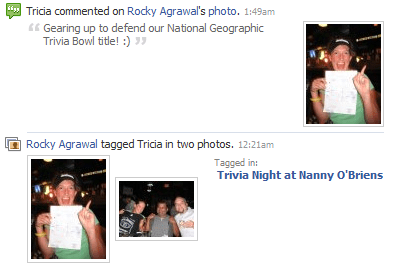
When I added the people tags, each of the people I tagged received a message that there was a new picture of them online. Who wouldn’t want to log in to see what kind of potentially embarrassing pictures might be up there? When they logged in to view the pictures, some of them also left comments. Which triggered a message to me saying people left comments. And then I logged in to see the comments.

Comments and tagging in Facebook Photos

I didn’t know all of the people in my pictures. One of my friends tagged a few other people in my pictures. Which triggered notifications to those people.

You can also tag people who aren’t on Facebook by providing their email address. Yet another way for Facebook to grow their user base.

People who weren’t in the pictures — my friends or friends of people I tagged — saw messages in their news feeds, furthering the distribution.

In less than 24 hours, the pictures received four comments. The same pictures on flickr didn’t receive any.

More on: Facebook, flickr

Posted in facebook, flickr, marketing, photography, web 2, web 2.0 | 11 Comments

Rocky wuz here

LocPoke

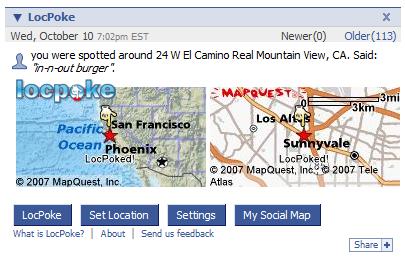
Location-based services have been hampered by the balkanization of carrier networks and a focus on mobile-only implementations. LocPoke, a new Facebook application, is a promising alternative.

I’ve written before about WHERE, a location service platform that has offered GPS-based location status updates for Twitter using a downloadable application. The application is available for Sprint and Alltel phones for a monthly fee.

WHERE’s LocPoke, allows you to show a map of your location on your Facebook profile. This application addresses many of the key barriers to adoption of the Where platform: it works on any network, it works on any phone, it doesn’t require a download and it’s free (except for SMS charges).  Just text your location to the SMS shortcode WHERE (94373) to update your location. The location can be set as a street address, ZIP code, city or neighborhood.

You can also text a phone number to identify your location. If you’re having dinner at Azie, you can text “dinner@4155380918” and the map will show the name and address of Azie. This method is too cumbersome to get wide adoption, but it points to a future where we’ll be sending actionable data instead of freeform text.

Friends can also prompt you to update your location. A friend clicking on the “LocPoke” button triggers an SMS prompting you to update your location. This capability can be limited to friends that you select. I’d like to see the option to click on the location to get driving directions.

The Social Map feature allows you to see where your friends are. It’s of limited use until LocPoke takes off.

Posted in facebook, gps, lbs, mobile, where, wireless, wireless data | 3 Comments

People tagging on Facebook

Regular readers of this blog know that I’m a big proponent of geotagging. As I’ve gotten deeper into Facebook, I’ve also become a big fan of people tagging.

People tagging allows you to uniquely identify people in pictures. Tagging can also be a collaborative effort. When I’ve uploaded pictures with people I don’t know, my friends have filled in the gaps.

Viewers can rollover the picture and the names are displayed.

It’s surprisingly addictive and it forms the basis of the real power of Facebook photos. More on that later.

It also raises privacy issues, beyond those that I discussed yesterday. On flickr, I deliberately don’t include last names because I don’t want the pictures to be searchable in general purpose search engine. I’ve been more comfortable uniquely identifying people in Facebook’s more closed environment.

Still, I wonder about the database that I’m helping to create. Given the enormous popularity of Facebook photos — it’s the number one photo sharing site — it’s likely that Facebook has the largest privately held database of individually identifiable pictures in the country. It would make a great training set for image recognition software. You’ve got uniquely identifiable people in a variety of situations and camera angles.

So far, most public efforts at image recognition haven’t been very successful. Riya, which started out as a visual people search tool, used tags and other metadata to help improve the results. Even that wasn’t good enough. Riya has largely refocused on identifying merchandise.

Posted in facebook, flickr, photography, privacy, social networking, web 2, web 2.0 | 3 Comments

Using photos to show the story

A common refrain in journalism schools is “show don’t tell.” It means to make your writing sufficiently descriptive that readers can visualize what you’re talking about. Instead of writing that the “laptop looked old,” you should write “The laptop bore the logo of a long deceased company; the keys were sticky with years of donut crumbs and oil from fingers. The casing bore a tinge of yellow.”

Technology gives us an easier way to show: pictures. Unfortunately, most newspaper sites haven’t mastered this. They’re still stuck in a print mindset where the written word is king and photos are expensive window dressing. They edit photos for the one or two spaces they have in the paper.

Consider this story about the North American Sandsculpting Championship in Virginia Beach. It’s a story that’s screaming for pictures. The photographer who shot that story very likely shot dozens of pictures. They were edited down to the two that are shown.

In print, where you only have so much space and color costs money, this makes perfect sense. Online it doesn’t. Every photo that adds to that story should be online. (Except photos with serious exposure problems, nearly identical photos, etc.) Compare the two photos that are online with the selection of pictures I took at the event.

The two photos from the The Virginian-Pilot are certainly better than any of mine; but mine do a better job of giving users the flavor of walking down the beach and seeing the sculptures. My photos are also geotagged, making them easy to search for on maps. (This can be done by carrying a $150 GPS around while shooting.)

Slideshows are extremely popular among readers. They are also an easy way to tell the story better and get a lot of extra page views. Especially when the people who are in the pictures send the link around.

Pictures are especially critical for stories like restaurant reviews and travel pieces. These are visceral experiences where images can be critical to the reader’s decision and understanding. Compare these pictures from a restaurant opening with what you’re used to seeing on newspaper sites. Even mundane pictures like this menu add to the story.

Posted in flickr, journalism, media, newspapers, photography | 3 Comments

Flickr and privacy rights

Flickr is one of the treasures of the Web. You can find high quality images on just about every topic imaginable. It’s great for sharing with friends, planning vacations and illustrating blog posts. It also raises a lot of issues relating to intellectual property, privacy rights and publicity rights.

The New York Times has a piece on the intersection of social networks, privacy rights and intellectual property. Virgin Mobile in Australia used a picture of Alison Chang posted on flickr as part of a billboard. The picture had been uploaded by photographer Justin Ho-Wee Wong, who assigned a Creative Commons license, allowing for commercial use of his picture.

Under U.S. law (which I don’t think would apply in this case), there are two separate issues. One is the rights of the photographer who took the picture. It seems that in case, the license provided by Wong allowed for use by Virgin Mobile. The other issue is the the rights of the person in the photo. Generally speaking, your picture cannot be used for commercial purposes without your consent. It can however be used for editorial purposes; if you’re at a news event, a newspaper or TV station doesn’t have to have your permission to show you.

Of course, this brings up the issue of defining “commercial purposes” and “consent.” Is Google Street View a commercial use? What if they put ads around the Street View images? Many semi-public places like sports arenas and theme parks state (often in fine print on the back of your ticket) that you give consent to commercial use of your likeness by entering. These same places prohibit you from using pictures that you take inside for commercial purposes.

Renee at DC Coast

I’ve thought a lot about these two issues as I’ve uploaded pictures to flickr. I typically post pictures with a Creative Commons Attribution-Noncommercial-Share Alike 2.0 Generic license. People are free to use my pictures for noncommercial purposes, as long as they credit me. They can also make derivative works, as long as those works are also shared. In two cases that I know of, my pictures have appeared in print publications.

The other issue is privacy. I try to edit out (or at least mark private) any images that might be embarrassing to my friends. I don’t include people’s last names in the tags or descriptions to prevent directed searches. I’ve had a couple of requests to take down or edit images of friends, which I honor.

Posted in flickr, intellectual property, photography, privacy, street view | 3 Comments